Walked Guest
Report parameters
|
Field |
Description |
|---|---|
|
Report Name |
The name of the report. |
|
Start Date |
The start date from when the data must be considered for generating the report. |
|
End Date |
The end date until when the data must be considered for generating the report. |
Sample Report
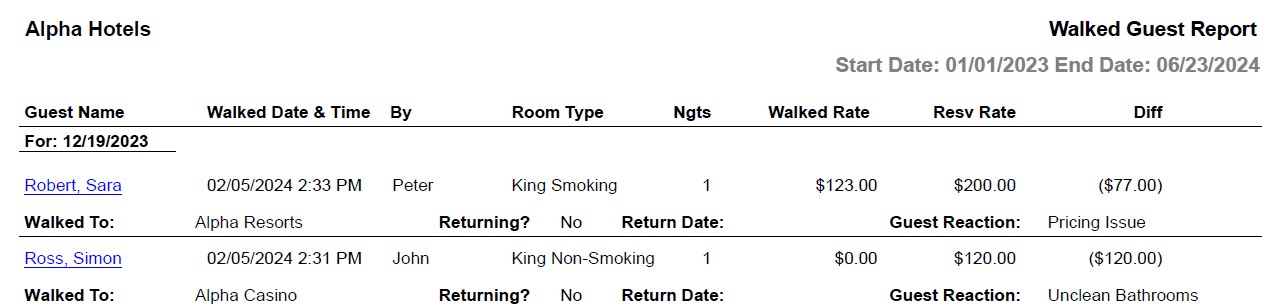
Report Fields
|
Field |
Description |
|---|---|
|
For |
The date for which walked guest information is displayed. |
|
Guest Name |
The last name and first name of the guest will appear as a hyperlink and clicking it will navigate the user to the guest record. |
|
Walked Date & Time |
The date and time at which the guest was walked to another property. |
|
By |
The ID of the user who handled this. |
|
Room Type |
The room type is displayed. |
|
Ngts |
Number of nights of stay. |
|
Walked Rate |
The rate for the reservation in the property to which the guest is walked to. |
|
Resv Rate |
The rate for the reservation in the current property. |
|
Diff |
The difference of walked rate and resv rate. |
|
Walked To |
The name of the property to which the guest is walked to. |
|
Returning |
Indicates whether the guest want to come back to the current property. |
|
Return Date |
The date on which the guest would return. |
|
Guest Reaction |
Comments made by the guest, if any. |
|
Grand Total |
|
|
Total Walked Rates |
The sum of all walked rates. |
|
Total Lost Resrv |
The sum of all lost reservation amounts. |
|
Difference |
The difference of total walked rates and total lost resrv fields. |
|
Total LostRoom Nights |
The total number of nights for which the revenue is lost. |